
Navigate your dashboard
Updated Oct. 13, 2026 by SupportAfter you sign in, you are taken directly to your enterprise dashboard. This is your main control center, where you can review key data for your account and move quickly to different areas of the platform.
The enterprise dashboard is designed to give you clear visibility on coach and coachee appointments, coaching sessions, and active engagements.
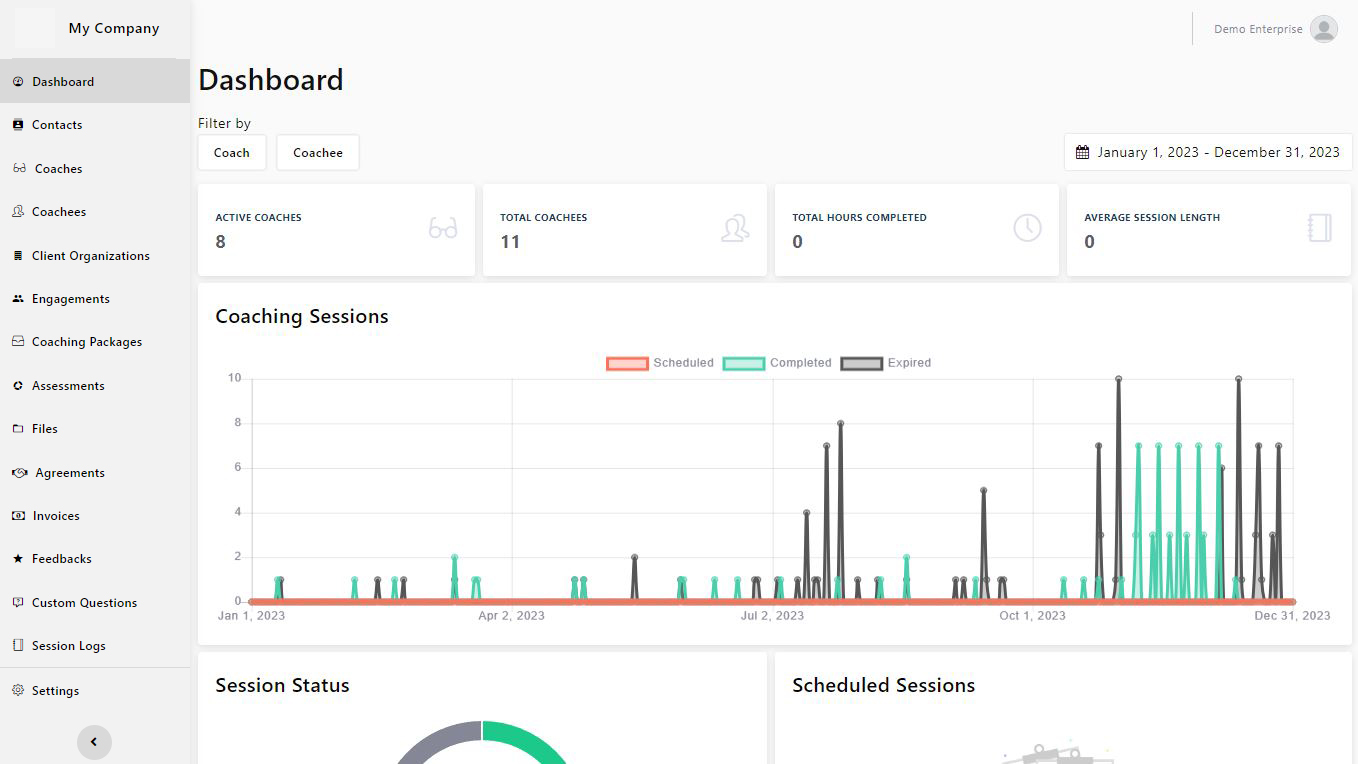
 Review Account Statistics
Use the Account statistics area to see a snapshot of your organization’s activity, including:
-
Total number of coaches in your account
-
Total number of coachees in your account
-
Total coaching session hours completed
-
Average duration of completed sessions
This section helps you understand overall usage and capacity at a glance.
Track Session Activity
In the Session logs section, you can monitor coaching activity and session history, including:
-
Coaching sessions overview chart
-
List of upcoming (scheduled) sessions
-
List of completed sessions
-
Session status metrics (such as scheduled, completed, canceled, or no-show)
These views make it easier to follow session trends and identify follow-up needs.
Monitor Engagement Progress
The Engagements area allows you to keep an eye on active coaching engagements across your organization:
-
See engagements that were most recently updated
-
Review the current status of each engagement
This helps you track how coachees are progressing through their coaching programs.
Filter and Refine Your Dashboard Data
Use the Filter options to focus on the information that matters most:
-
Filter data by specific coach or coachee
-
Filter data by a selected date range
Applying filters allows you to drill down into particular teams, time periods, or coaching relationships for more detailed analysis.

