
Manage your goals
Updated Oct. 27, 2025 by SupportThe Goals section helps you plan and track your long-term development journey. Each goal represents a broader objective that you want to achieve, while Milestones and Actions break that goal down into smaller, manageable steps.
This structure allows you to monitor progress, stay accountable, and celebrate achievements along the way.
 How Goals Work
- A Goal is a high-level objective that contains one or more Milestones.
- Each Milestone includes several Actions (tasks) that help you move toward completing the milestone.
- A Goal is marked as complete only when all related Milestones are completed.
- Milestones are completed once all associated Actions have been marked done.
- Both you and your coach can adjust the completion percentage of each action to reflect actual progress.
This system ensures your development journey remains transparent, structured, and measurable.
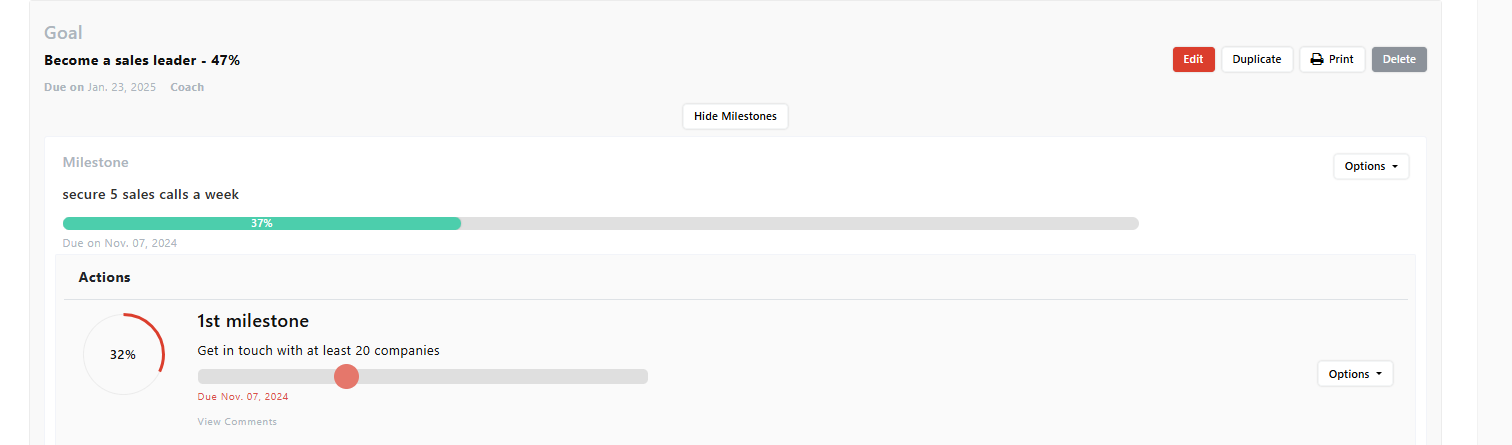
Access the Goals Section
- From the main menu, click Goals.
- You’ll see a list of all your active and completed goals.
- Each goal displays its title, due date, and overall completion percentage.
This view helps you understand where you stand and what requires your attention next.
Create a New Goal
- Click + New Goal on the top-right corner of the Goals page.
- Select the coach who will overseeing your goal progress and achievement
- Enter a Goal Title that clearly defines your objective.
- Set a Due Date to help you stay on track.
- Click Submit to create your goal.
 Note:
Note:
- Once created, your coach will be notified automatically, ensuring they remain informed about your development priorities.
- Your coach can create goals on your behalf and assign them to you.
Add Milestones to a Goal
Milestones represent key checkpoints within your goal—smaller achievements that mark progress along the way.
To add a new milestone:
-
Click on an existing goal.
-
Select View Milestones.
-
Click + New Milestone.
-
Enter a Milestone Title and set a Due Date.
-
Click Submit to finalize.
Each milestone will appear under your selected goal, ready for you to add specific actions or tasks.
Create an Action Under a Milestone
Actions are the individual steps or tasks that help you complete each milestone.
To create an action:
- Under the milestone, click Create One Now if this is the first action you are creating or go to Options > Add New Actionif this is not teh first action you are creating.
- Enter an Action Title and set a Due Date.
- Click Save to add it.
Each action will include a progress bar you can update manually as you work toward completion.
Note:
You’ll receive a notification and an email whenever your coach assigns or updates an action, ensuring both of you stay aligned.
Track and Update Your Progress
You can monitor your progress directly from the Goals page:
- Update actions' completion percentages as you move forward.
- Review which milestones or actions still need attention.
- Discuss your updates with your coach during sessions.
This interactive tracking helps you maintain accountability and ensures your progress remains visible to both you and your coach.
Edit, Duplicate, or Delete Goals, Milestones, and Actions
You can easily manage your existing goals, milestones, and actions directly from the Goals page.
To Edit or Duplicate a Goal:
- Click the Edit button next to the goal title to change the Title or Due Date.
- Click the Duplicate button to copy the goal.
- When prompted, select Yes to duplicate all related milestones and actions.
- Select No if you only wish to duplicate the goal without its milestones and actions.
- To remove a goal completely, click Delete and confirm your choice.
To Edit or Manage Milestones:
- Click the Options button next to the milestone title.
- From there, you can:
- Edit the milestone details.
- Duplicate the milestone.
- Add a New Action under it.
- Delete the milestone if no longer needed.
To Edit or Manage Actions:
- Click the Options button next to the action name.
- Choose whether to Edit, Duplicate, or Delete the action.
This flexibility allows you to easily update your plans as your coaching journey evolves while keeping your progress organized and accurate.

