
Create engagement templates
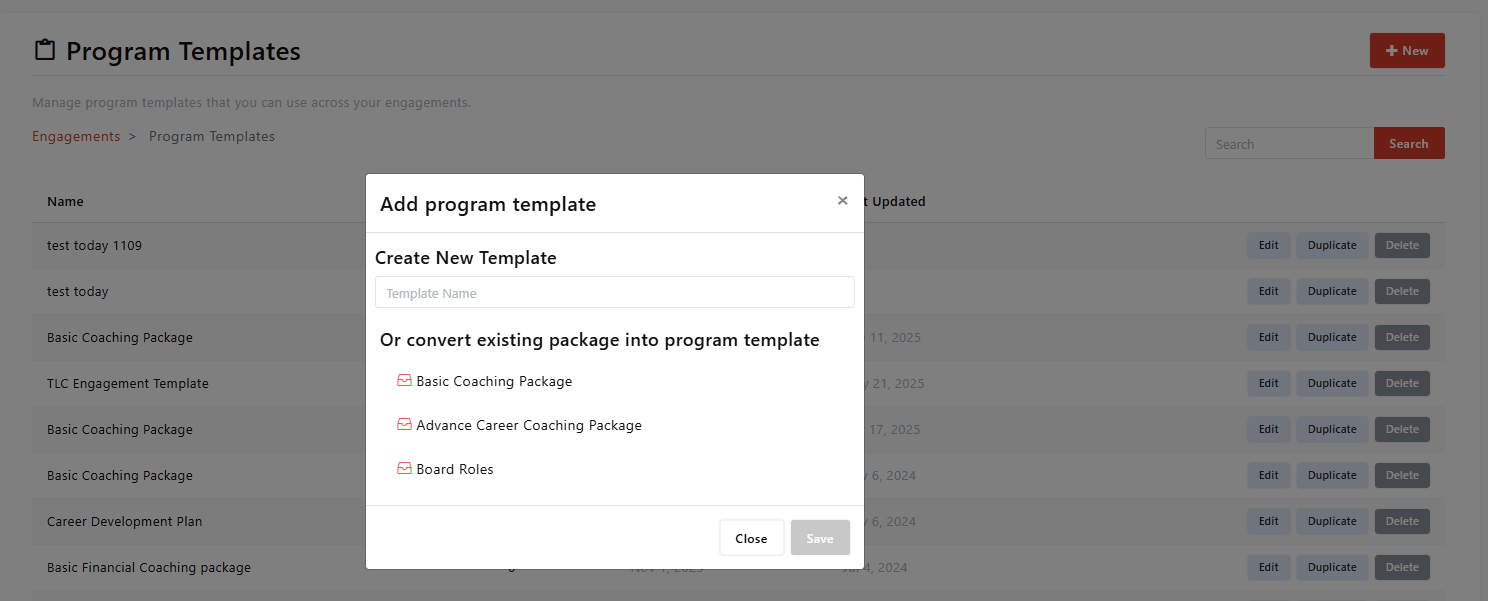
Updated Dec. 10, 2025 by SupportEngagement Templates (also known as Program Templates) help you design structured and repeatable coaching programs that can be easily customized for different coachees or teams. You can either create a new program from scratch or convert an existing coaching package into a reusable template.
 Create a Program Template from Scratch
- Go to the Engagement tab in the left-hand menu of your coach portal.
- Click Program Templates.
- You’ll be directed to the Program Template List page.
- Click + New at the top-right corner of the panel.
- Enter a Template Name and click Save.
- Click + Add Items to start building your program structure.
- You can include coaching sessions, assessments, resources, files, or links.
- When finished, choose one of the following options:
- Save & Exit – Store the template for future use.
- Create Engagement Using This Template – Assign it immediately to one or more coachees and begin the program.
Create a Program Template from an Existing Coaching Package
- Navigate to the Engagement tab in your left-hand menu.
- Click Program Templates.
- On the Program Template List page, click + New.
- From the dropdown list, select the Coaching Package you want to convert.
- Click Save to create a new Program Template automatically.
- The template will include all sessions, actions, and resources from the selected package.
- You can freely add, edit, or remove items to tailor it further.
- Once ready, you can:
- Save & Exit – Keep the template for future engagements.
- Create Engagement Using This Template – Apply it directly to your coachee(s).
 Pro Tip
Program templates are fully reusable and flexible. Updating a template will not impact existing or completed engagements, allowing you to refine your designs while preserving ongoing coaching programs.
Manage Items in a Program Template
When creating or editing Program Templates, coaches can:
- Remove items by clicking the
 icon.
icon. - Duplicate items using the
 icon.
icon. - Reorder items by dragging and dropping them into the desired sequence.

