
View notifications
Updated Oct. 16, 2025 by SupportThe Notification Center is your go-to space for staying informed and on top of all key activities happening within your account. It delivers real-time alerts and updates so you never miss important actions, messages, or milestones.
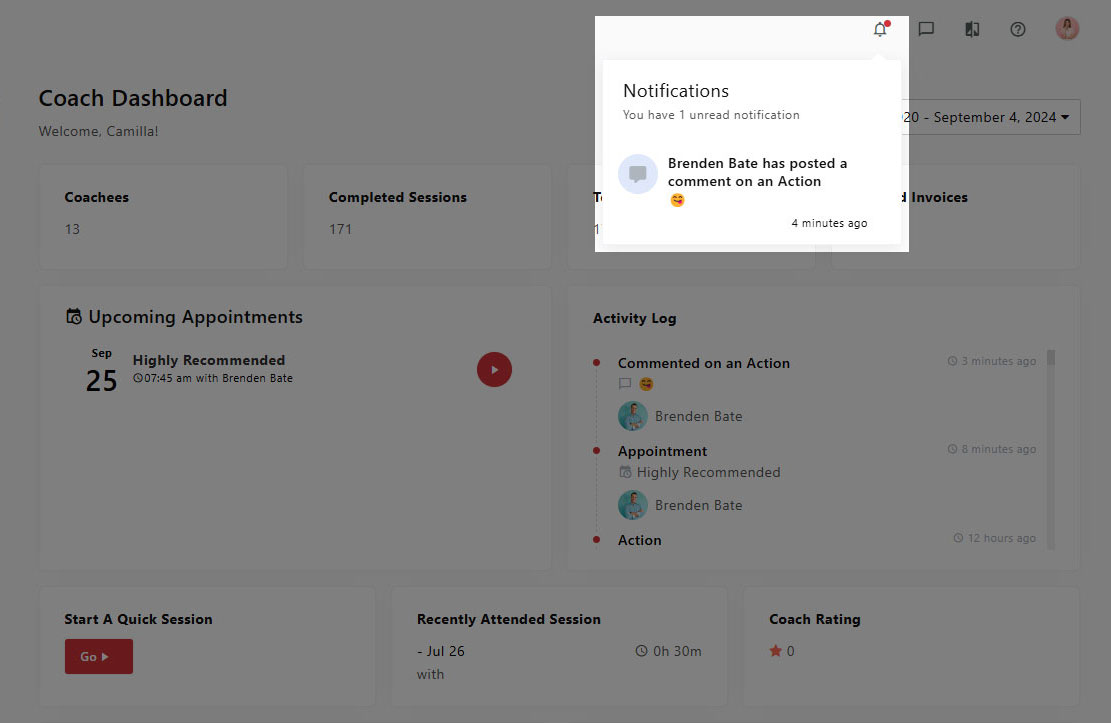
 Access the Notification Center
- Click the bell icon in the top navigation bar.
- Unread alerts will appear highlighted.
- Click any notification to open the related page or update.
- Notifications are listed chronologically and can be revisited anytime.
Types of Notifications You May Receive
Notifications are automatically generated based on your account activity and interactions, including:
- Coachee invitations sent or activated
- New session booked
- Session rescheduled, canceled, or marked as no-show
- Upcoming session reminders
- Completed session summaries
- Assessments assigned or completed
- Goals, milestones, or actions created or completed by coachees
- Feedback submitted by coachees
- New messages in one-on-one or group chats
- Files shared between coaches and coachees
Note: All alerts displayed in the Notification Center are also sent to your registered email address so you remain informed even when not logged into your account.
Benefits of Using the Notification Center
- Stay Organized: Instantly view updates that require your attention.
- Real-Time Alerts: Get notified as soon as new actions occur.
- Seamless Collaboration: Keep communication flowing between coaches and coachees.
- Accountability Tracking: Monitor when sessions, goals, or feedback are updated.
Troubleshooting
If you’re not receiving notifications as expected:
- Check your email spam or junk folder.
- Make sure your browser and system notification permissions are enabled.
- Confirm that your account email address is correct and active.

