
Manage your email notifications
Updated Apr. 30, 2026 by SupportThis feature allows coaches to control which automated email notifications they want to receive, as well as which notifications their coachees will receive. By customizing these settings, you can reduce unnecessary emails and make sure only relevant updates are sent.
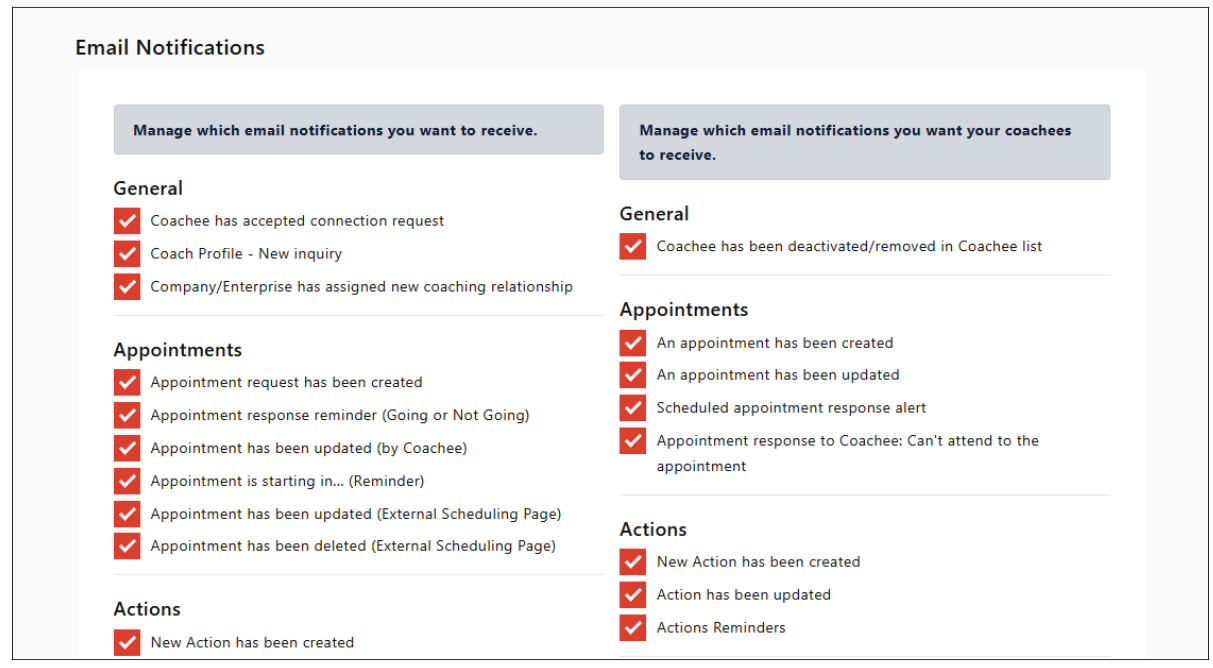
 Configure Your Email Notifications
- Click on your profile photo at the top-right corner.
- Click Settings.
- Scroll down and click Email Notifications > Configure.
- In the left column, toggle On/Off the notifications you want to receive in your inbox.
- In the right column, toggle On/Off the notifications you want your coachees to receive.
- Click Save Changes to apply your preferences.
That’s it — your email notifications are now configured.
 Pro Tip:
Review your notification settings regularly. This ensures you and your coachees receive only the most useful and timely updates.

