
Navigate your dashboard
Updated Oct. 16, 2025 by SupportAfter logging in, you will be redirected to your coach dashboard. The dashboard is the central hub of your account, giving you a quick overview of your activity and easy access to important data and tools. You can also open your dashboard anytime by clicking Dashboard in the left-hand menu.
The dashboard helps you:
- View account statistics
- Track coachee activity
- Access key features quickly
- Monitor upcoming sessions and tasks
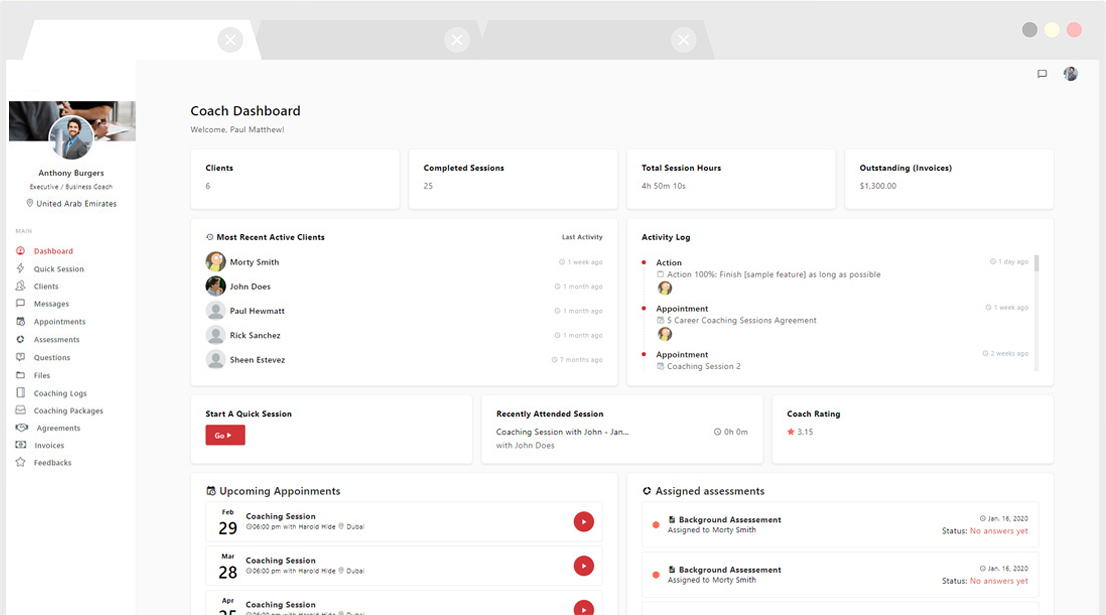
 Account Statistics
See a summary of your overall coaching activity, including:
- Total coachee count
- Total completed sessions
- Total coaching session hours
- Unpaid invoices
- Coach rating
Activities
Monitor coachee engagement directly from the dashboard:
- Track your coachees’ most recent logins
- View the latest updates in the Activity Log
Quick Access
Save time by accessing key tools in one click:
- Start a new coaching session
- Open your most recent session notes
- View recently attended sessions
- Check assigned assessments (including pending and completed answers)
- Review upcoming appointments
Filters
Apply filters to refine the data displayed on your dashboard:
-
Filter by date range to focus on weekly, monthly, or custom activity.
 Pro Tip:
Make it a habit to check your dashboard at the start of each day. It gives you a real-time snapshot of your coaching activity, helping you prioritize tasks and stay on top of your coachees’ progress.

