
Set up coachee feedback & rating
Updated Dec. 10, 2025 by SupportThe platform includes a built-in feedback and rating system that helps coaches collect valuable insights from coachees, assess performance, and identify areas for continuous improvement.
 Access Feedback
Go to the “Feedback” tab in the left-hand menu of your Coach Portal.
From here, you can view all received feedback, adjust settings, and customize your feedback survey preferences.
 Feedback Settings
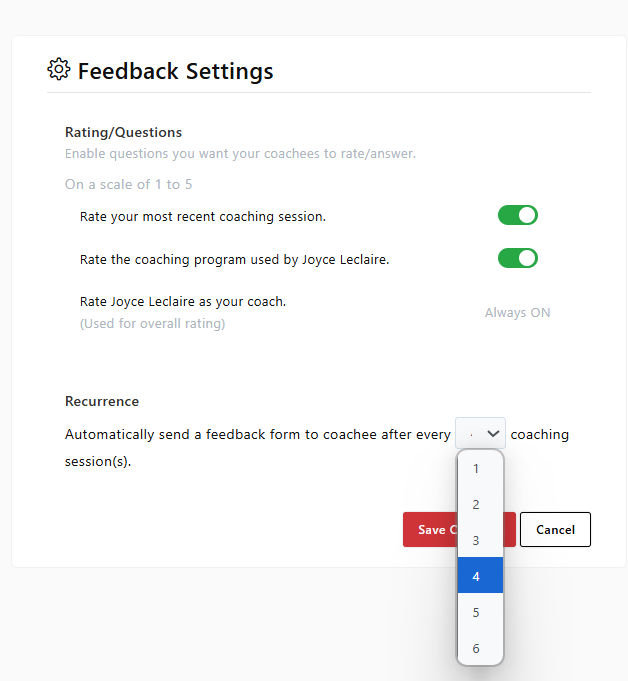
In the Feedback Settings panel (located in the top-right corner of the Feedback page), you can:
Toggle Feedback Questions On or Off
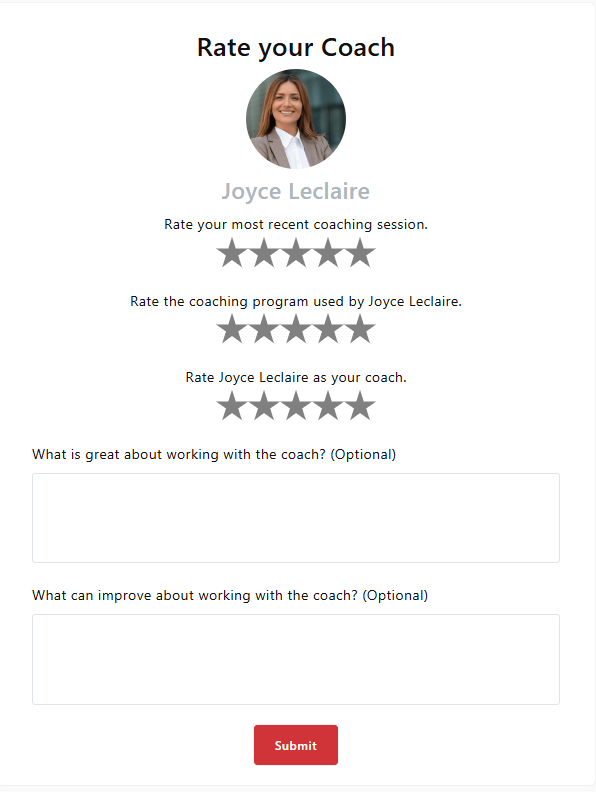
- Two Star Rating questions are included by default, allowing coachees to provide personalized comments and reflections.
- Choose which questions will appear in the coachee’s feedback form.
 Note:
Note:
The question “Rate [Coach Name] as your coach” is always active and cannot be disabled.
Set Feedback Recurrence
- Decide how often coachees receive the feedback form (for example, after every session or every third session).
- The system automatically sends the form to the coachee’s email based on your chosen settings.
\
Open-Ended Questions:
- Two text-based questions are always included by default. These allow your coachees to leave written feedback.
 Why Feedback Matters
-
Monitor coachee satisfaction and engagement
-
Enhance your coaching quality and impact
-
Identify improvement opportunities
-
Build trust and reputation through authentic testimonials

