
Coaching practice management software, built around your clients.
Client records, scheduling, session notes, agreements and invoicing in one place, with a free portal for every client, so more of your week goes to coaching.
4,300+ professional coaches are on CoachingLoft.com.
What is it?
What is coaching practice management software?
Coaching practice management software is the system a coach or coaching firm uses to run the business side of coaching in one place: client records, scheduling, session notes, agreements, invoicing and reports. It takes over from the spreadsheets, document folders and email threads most practices start with, and it works with the calendar you already use.
Some people call it coaching practice software, or a coaching practice management platform. The test is the same: can you open one client and see their sessions, notes, goals, actions and files without switching tools? In Coaching Loft you can, and the coaching dashboard shows your coachee count, completed sessions, session hours and unpaid invoices at a glance.
It is the operational core of our coaching software, and the same platform runs a coaching firm: firm accounts add an admin panel on top of every coach tool.
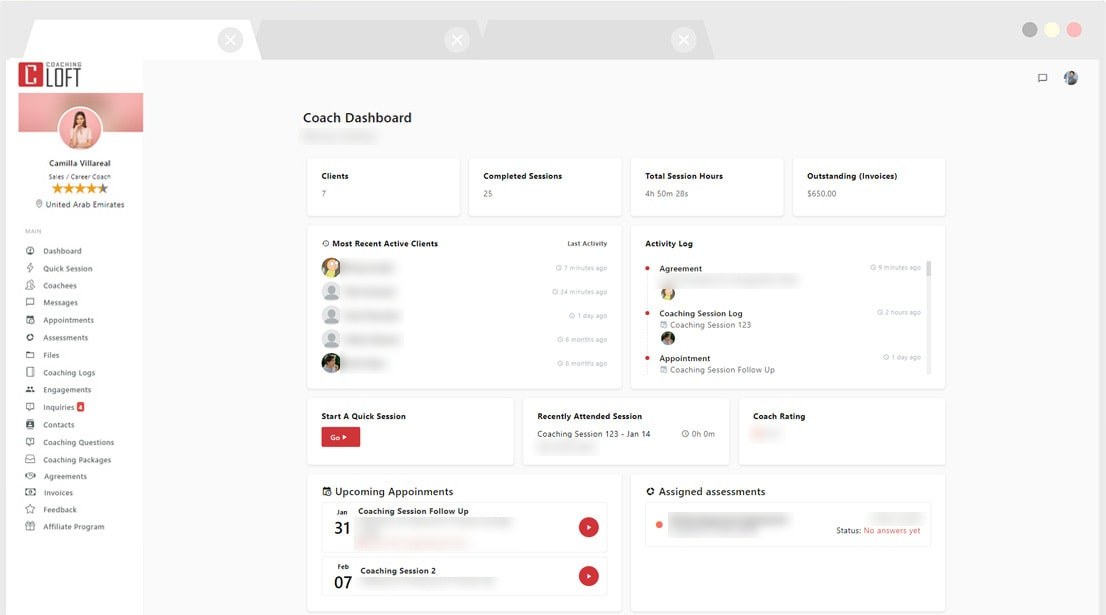
Client management
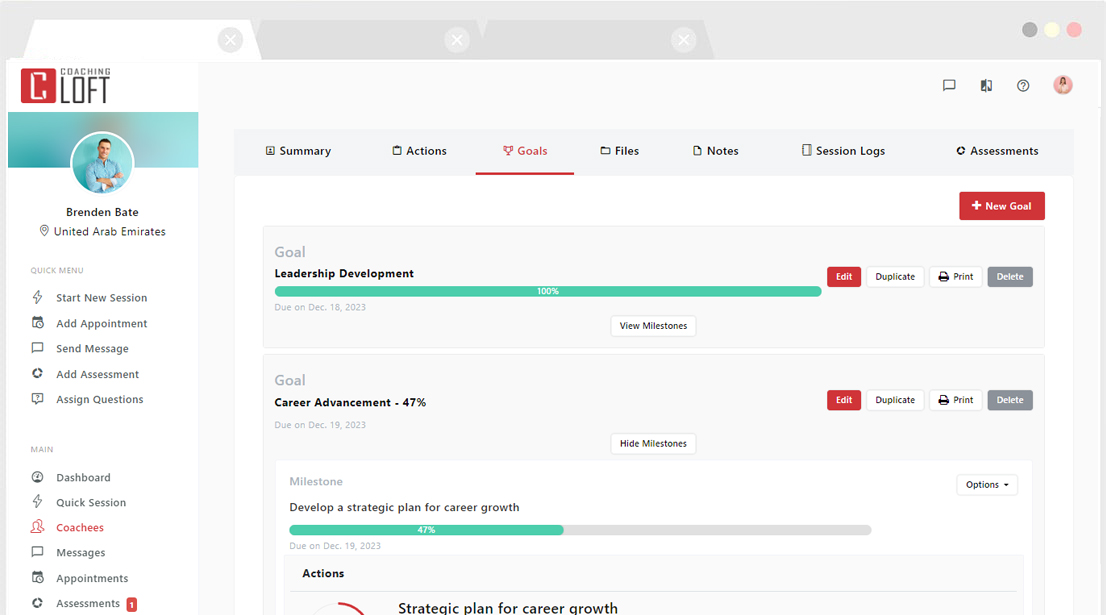
Coaching client management software: one record per client
Every coachee has a profile that holds the whole relationship: activity summary, actions, goals and milestones, files, notes, session logs and assessments. From inside a profile you can start a session, add an appointment, send a message, add an assessment or assign coaching questions in one click. If you have been looking for client management software for coaches, this is the part of Coaching Loft that does that job.
Many coaches start out searching for a CRM for coaches, or a coaching CRM. What they usually need is this: one place for every client, their history and the next step.
- A coachee list with filters, invitation status and coachee groups for programs and group work
- Your own notes next to the notes a coachee shares with you
- Files on the coachee's profile, shared with them when you choose
- A contact list for prospects, imported from a CSV file; on Core and up, client leads from your directory profile
Scheduling
Scheduling, sessions and reminders in one calendar
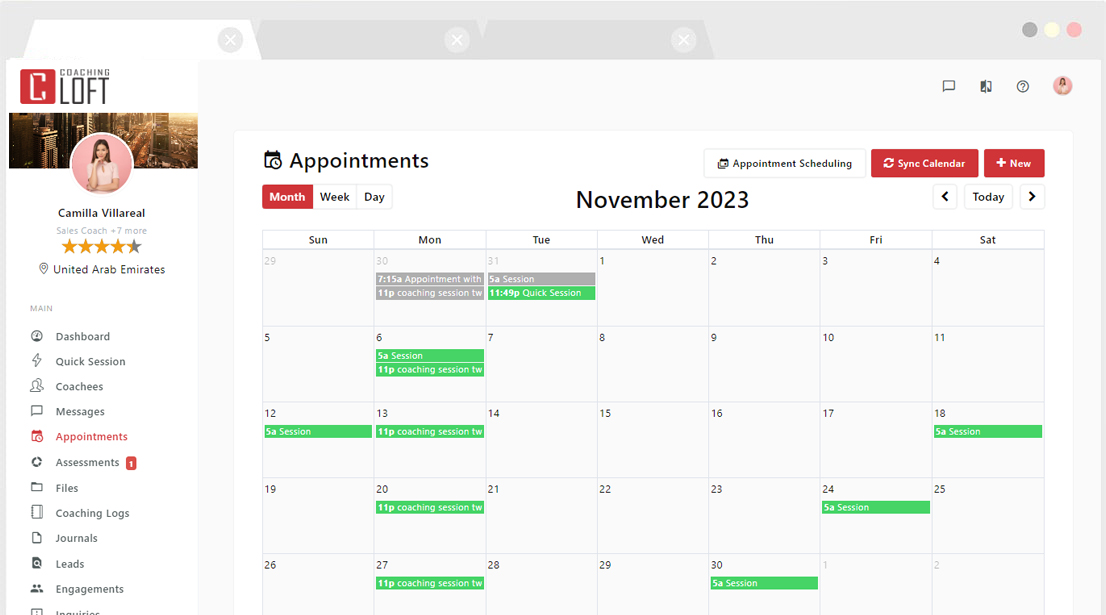
Book sessions from your calendar, one at a time or as a recurring series. On Core and up, scheduling pages let clients book your open slots themselves, and each booking lands in your calendar with an email confirmation for both of you.
- Calendar sync: Google Calendar on every plan; Exchange, Outlook and Office 365 from Core
- An automatic reminder one hour before each session
- Group coaching on Core and up
More on the appointments calendar.
Sessions and notes
Session notes and coaching logs, kept with each client
Start a scheduled session from your dashboard, or open a quick session for an unscheduled one, and the Coaching Notepad opens with your prep notes, the coachee's completed assessments, assigned questions and open actions beside the page you write on. Add actions as you go, book the next session before you close, and choose whether to share the notes with the coachee.
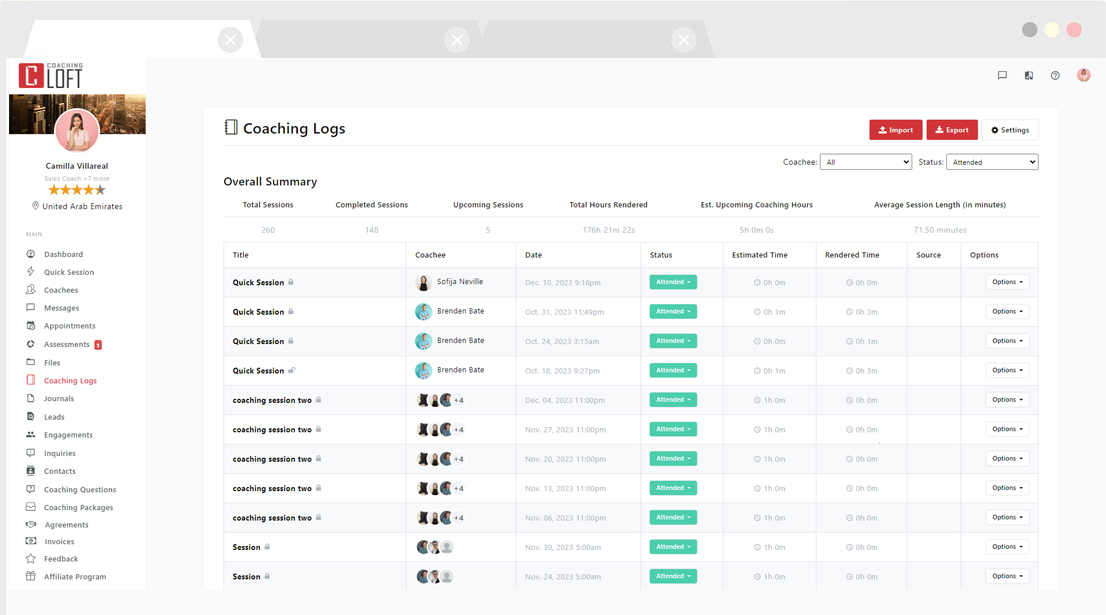
- A session log with totals: completed and upcoming sessions, logged hours and average session length
- Sessions you ran outside the platform, imported one at a time or in bulk
- Coaching logs you can export as a report, plus reports and analytics on Core and up
- On Premium, Master and firm accounts, AI Notepad Summaries turn your raw notes into goals, actions and conclusions
See the session notepad and coaching logs.
Agreements and invoicing
Agreements, invoices and payment tracking
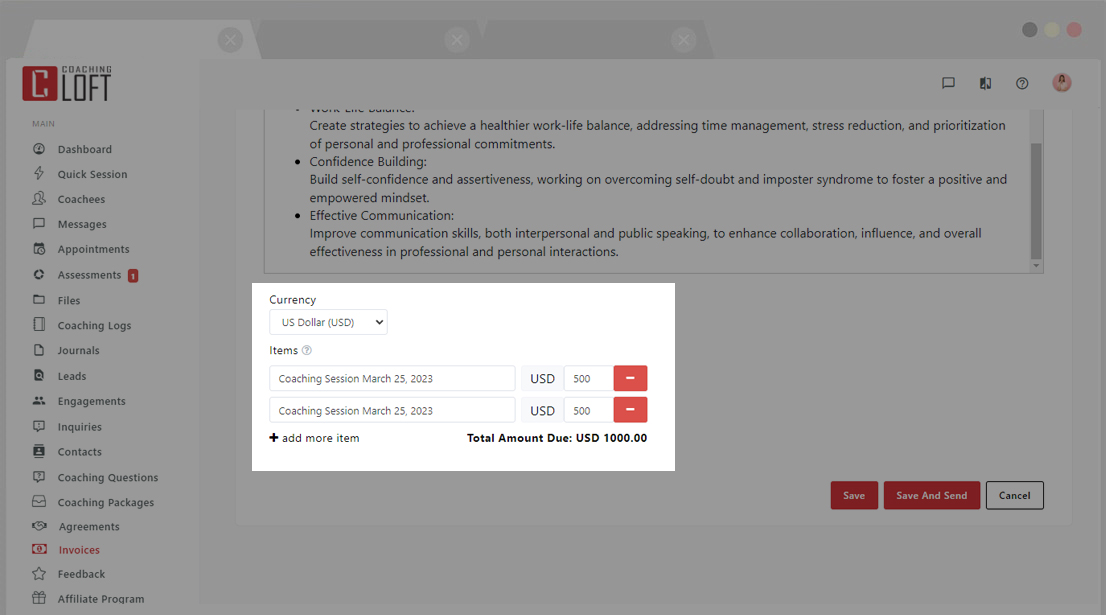
Write an agreement once as a template, set the number of sessions and the invoicing dates, and send it to the coachee to review and e-sign. When it is signed, the agreement turns active and its invoices are created and sent on schedule.
Your payments stay with the payment provider you already use. Coaching Loft puts your payment link on each invoice and keeps track of what is paid.
- Invoices with sequential numbers, line items and optional VAT, sent now or on a set date
- Automatic reminders for unpaid invoices, and paid or unpaid status at a glance
- Invoice exports by date range or by coachee, for your records
- Coaching packages you sell, and program templates with milestones, timelines and items that are sent automatically
Agreements, invoicing, packages and program templates are on Core and up, and included for firms.
More on coaching agreements, invoicing and coaching packages.
Between sessions
Goals, actions and a free portal for every client
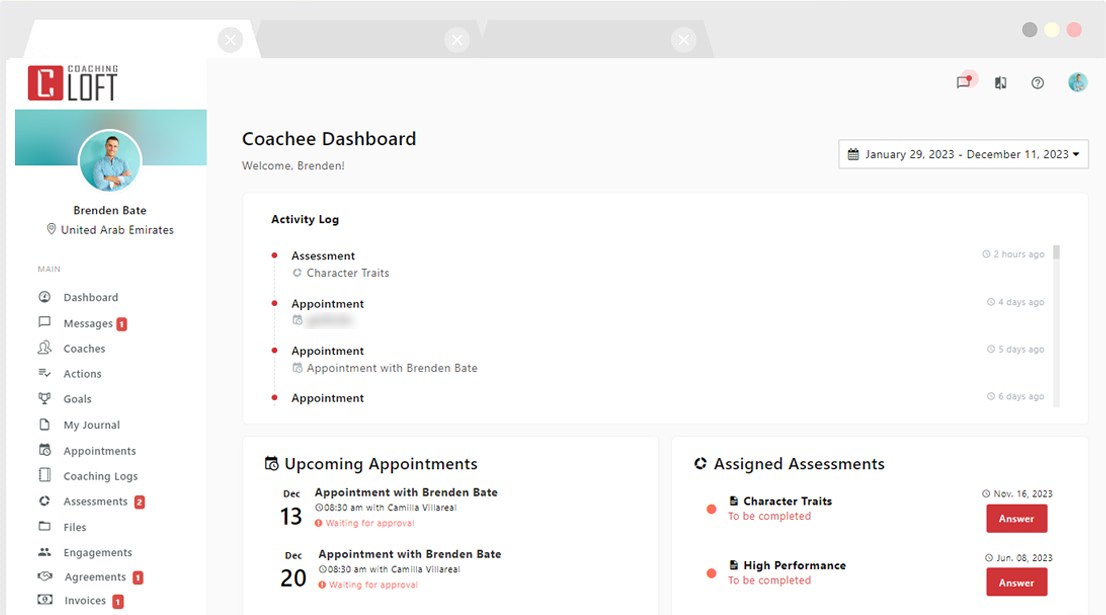
Every client gets their own portal at no extra cost, on every plan. They use it to chat with you and complete the tasks you set, and they see their goals, actions, assessments and the files you share. On Core and up, they can also book your open slots through your scheduling pages.
- Goals broken into milestones and actions, with a progress meter the coachee updates
- Recurring actions for habits between sessions, and an email to you when a coachee updates their progress
- 500+ coaching questions to assign before a session
- Web, iOS and Android apps on every plan
More on the coaching client portal and goals and milestones.
For coaching firms
One practice management platform for every coach in your firm
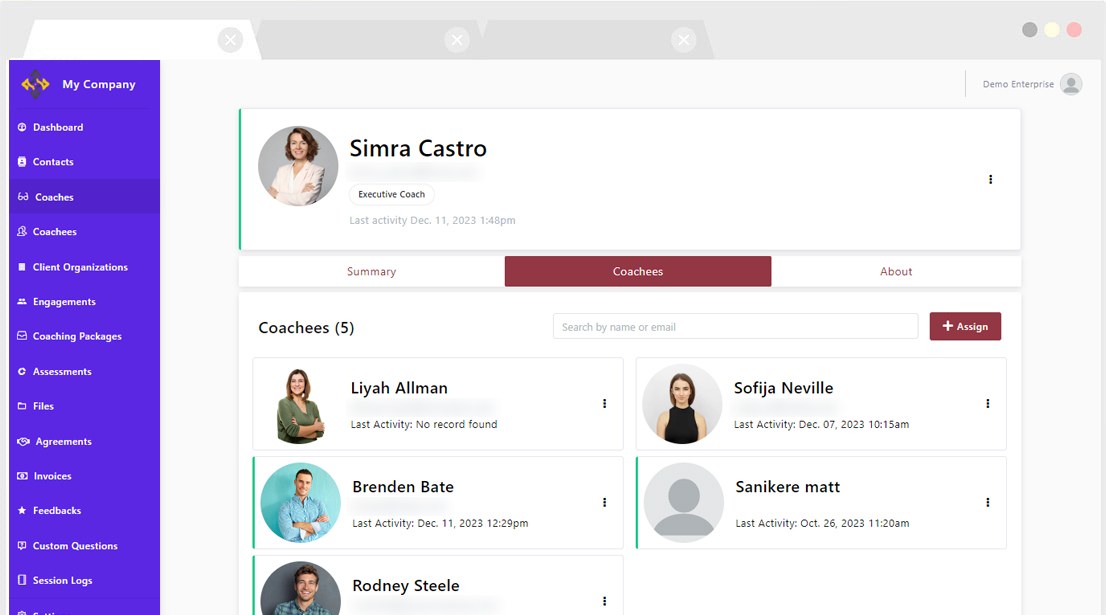
Firm and enterprise accounts add the Enterprise Panel on top of every coach tool. Admins add coaches and coachees, assign or move clients between coaches, and follow activity, completion and feedback across the team. You pay for coach seats only; coachee and admin seats are free and unlimited.
- AI Coach Matching pairs coachees with coaches by goals, expertise, availability and style
- In-house and external coaches managed side by side
- Bulk upload of up to 1,000 engagements at once
- Invoicing templates, so every coach invoices the same way
- White label: your logo, colors and navigation on your own domain
- $95 per coach seat a month on a 12-month term, or $950 per seat a year, with a 30-day free trial
Running coaching across an organization? See employee coaching software.
For life coaches
Life coach practice management software
A life coaching practice runs on the same things as any other: discovery calls, recurring sessions, goals the client works on between meetings, and invoices. Whether you call it a life coach practice management system or just your back office, everything on this page works the same way for a solo life coach.
Plans
Plans and free trials
Individual coaches
Basic is $12 a year for 2 active clients, with client management, session notes, goals and free client portals. Core, at $25 a month or $250 a year, adds scheduling pages, agreements, invoicing, packages, group coaching, assessments and reports. Premium ($55 a month) and Master ($95 a month) add more active clients and four AI tools: AI Notepad Summaries, Luma (an AI coach assistant), AI-generated reports and predictive analytics. The AI Support Agent is on every plan. Core, Premium and Master come with a 30-day free trial.
Coaching firms
$95 per coach seat a month on a 12-month term, or $950 per seat a year. Coachee and admin seats are free and unlimited. 30-day free trial.
Questions
Questions about coaching practice management software
What is coaching practice management software?
Coaching practice management software is the system a coach or coaching firm uses to run the business side of coaching in one place: client records, scheduling, session notes, agreements, invoicing and reports. It takes over from the spreadsheets, document folders and email threads most practices start with, so each client's history sits in one record, and it works with the calendar you already use.
What is coaching client management software?
Coaching client management software keeps one record per client, with their sessions, notes, goals, actions and files, plus a portal the client logs into. Every Coaching Loft plan includes client management and a free portal for each client, with no per-client fee.
Is Coaching Loft client management software for coaches, or a full practice platform?
Coaching Loft is client management software for coaches and a full practice platform: client management is on every plan, and the business tools of a full practice platform start on Core. Basic, at $12 a year for 2 active clients, includes client management, session notes, goals and free client portals. Core, at $25 a month or $250 a year, adds scheduling pages, agreements with e-signature, invoicing with payment tracking, coaching packages, group coaching, assessments and reports.
What should coaching practice management platforms include?
Coaching practice management platforms should cover client records, scheduling with calendar sync, session notes and logs, agreements, invoicing and a client portal. Before you choose one, check three more things: whether you pay a fee for each client (in Coaching Loft you do not: each plan includes a set number of active clients, and client portals are free), whether you can import sessions you already ran, and whether the same platform can run a firm when you add coaches.
Can I bring my existing clients and session history into Coaching Loft?
Yes, you can bring your clients and past sessions into Coaching Loft: add coachees one by one, import your prospect contacts from a CSV file and add each one to your coachee list, and import sessions you ran outside the platform one at a time or in bulk. Invite each client to their portal when you are ready. Firm and enterprise accounts can also bulk upload up to 1,000 engagements at once.
Does Coaching Loft handle invoicing and payments?
Coaching Loft handles invoicing and payment tracking, while the money itself goes through the payment provider you already use. Create invoices yourself or let a signed agreement send them on schedule, add your provider's payment link to each invoice, turn on automatic reminders for unpaid invoices, and mark each invoice paid when the money arrives. Invoicing is on Core and up.
Does Coaching Loft work for a coaching firm with several coaches?
Yes, Coaching Loft works for firms: firm and enterprise accounts add the Enterprise Panel to every coach tool, so admins can add coaches, assign clients and follow activity across the team. You pay $95 per coach seat a month on a 12-month term, or $950 per seat a year; coachee and admin seats are free, and the free trial is 30 days.
How much does Coaching Loft cost, and is there a free trial?
Coaching Loft coach plans run from $12 a year (Basic, 2 active clients) to $95 a month (Master, the largest active-client allowance), and firm accounts are $95 per coach seat a month. Core, at $25 a month or $250 a year, is the first plan with agreements, invoicing and scheduling pages. Core, Premium and Master come with a 30-day free trial, and so do firm and enterprise accounts.
Does Coaching Loft work on mobile?
Yes. Coaching Loft runs on the web and in iOS and Android apps, on every plan.
Try it on your own practice.
Start a free trial and run real sessions before you pay, or book a demo and we will walk you through it.
Running a firm? Start a 30-day firm trial or book a firm demo.